 F&Bos
Switch from Petpooja to F&Bos: Restaurant POS Migration Guide
Planning to switch from Petpooja? Check what moves, what you prepare and how long it takes. F&Bos imports your menu, raw materials, customers and suppliers from spreadsheets, and a single outlet usually goes live in 2–3 days.
Can you switch from Petpooja to F&Bos?
Yes, but not with one click. F&Bos has no Petpooja integration. You download what your Petpooja account lets you export, and the F&Bos team converts your menu sheet as part of assisted setup. Raw materials, customers and suppliers can also be imported from spreadsheets.
Past bills and sales stay in your Petpooja exports; F&Bos starts from your go-live date. A single outlet usually goes live in 2–3 days.
Why restaurant owners evaluate a new POS system
Owners usually look again when their needs change: a second outlet, stock and food cost to control, a different way of pricing modules, or the kind of support they want. That says nothing bad about the current system; it's a question of fit. Compare both on your own menu with our F&Bos vs Petpooja comparison.
What restaurant data can be moved to F&Bos?
| Data | Moves to F&Bos? | How | You prepare |
|---|---|---|---|
| Menu, categories, prices, tax | Yes | Excel or CSV import; our team converts it | Current menu export |
| Variants, modifiers, combos | Set up | Configured in F&Bos | List of options |
| Raw materials and opening stock | Yes | Excel import | Item list and a stock count |
| Recipes | Set up | Entered for your dishes | Quantities per dish |
| Customers | Yes | Sheet import | Names and phones, with consent |
| Loyalty points | Yes | Opening balances | Points per customer |
| Suppliers | Yes | Sheet import | Supplier list |
| Staff logins | Set up | Created by role | Staff list and roles |
| Past bills and sales | No | Kept in your exports | Download before notice ends |
Source: F&Bos product team, 23 November 2026. "Set up" means configured in F&Bos rather than imported. What you can export depends on your Petpooja account; check it before you give notice.
What to prepare before changing restaurant POS software
- Menu with current prices and tax rates.
- Raw materials and a fresh stock count.
- Customer list and loyalty balances, with consent.
- Supplier list.
- Outlets, staff and the role each person needs.
- Device and printer models you want to keep.
- Sales reports and every GST invoice from the old system, saved in two places.
Never send passwords through a website form. Keep your old records: under Section 36 of the CGST Act, accounts must be kept for 72 months.
How to move from Petpooja to F&Bos
Outlets, menu, devices, modules
Menu, customers, reports, invoices
Menu, stock, customers, suppliers
Variants, recipes, printers, roles
Bills, KOTs, taxes, printing
New invoice series from day one
Setup and training are remote, by video call and WhatsApp; an on-site visit is possible. The full plan, with a printable checklist, is in our complete guide to switching restaurant POS software.
How long does restaurant POS migration take?
| Stage | What happens | One outlet |
|---|---|---|
| Export and review | You download data; we check it | Before day 1 |
| Setup | Menu import, printers, roles | Day 1 |
| Testing | Test bills, KOTs, taxes | Day 2 |
| Training and go-live | Staff by role, first live bills | Day 2–3 |
Source: F&Bos product team, 23 November 2026. 2–3 days is typical for one outlet. Large menus, detailed recipes, several outlets or new hardware take longer. Billing setup alone takes 1–2 hours with guided onboarding. Downtime depends on when you stop the old system, so go live on a quiet weekday.
Restaurant POS migration testing checklist
| Area | Check |
|---|---|
| Menu | Items, categories and variants are right |
| Prices and tax | Match your approved list |
| Bills | Test bills show GSTIN and the new series |
| Printing | Bills and KOTs print at the right station |
| Stock | Opening quantities match the count |
| Staff | Each login has the right role |
| Reports | Test sales appear in day-end |
Explore F&Bos restaurant POS features before switching
GST billing
Counter, table and takeaway bills; works offline.
Menu management
Categories, variants and modifiers.
Inventory
Deducted by recipe, on Pro or the ₹3,500 pack.
Roles and duplicate-bill OTP
On every plan.
Sales and margins
Day-end, item sales and dish margins.
Multi-outlet
One dashboard on Enterprise.
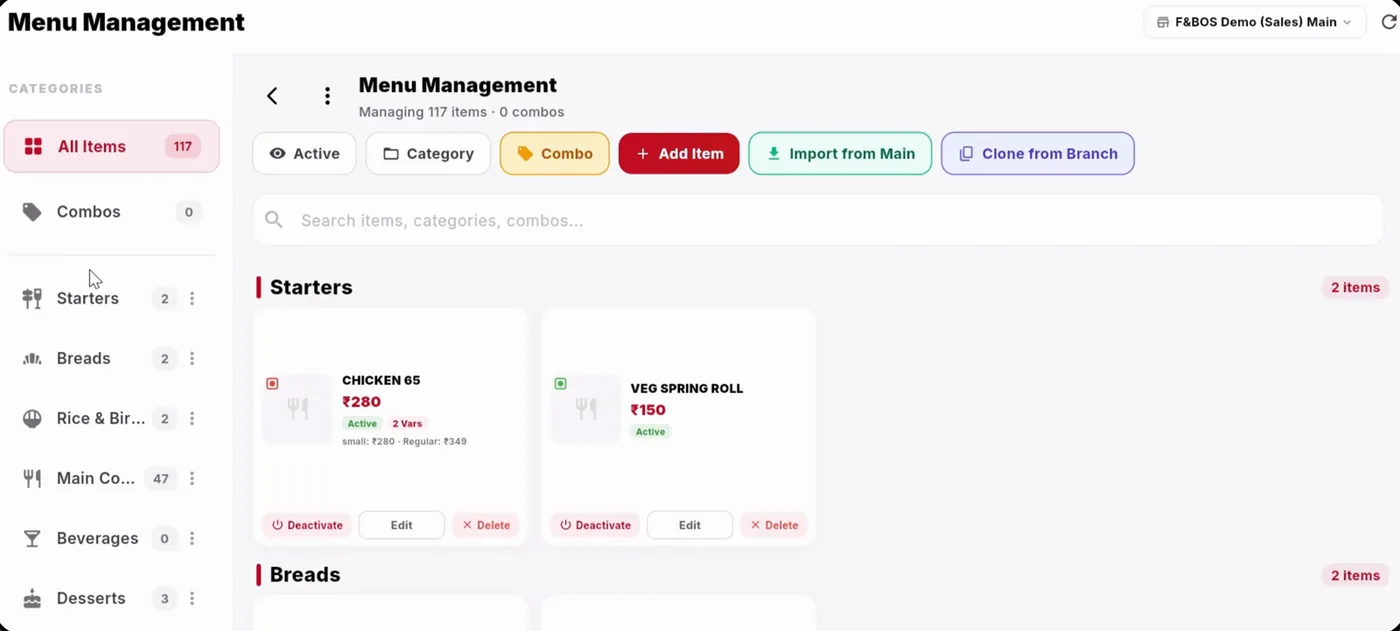
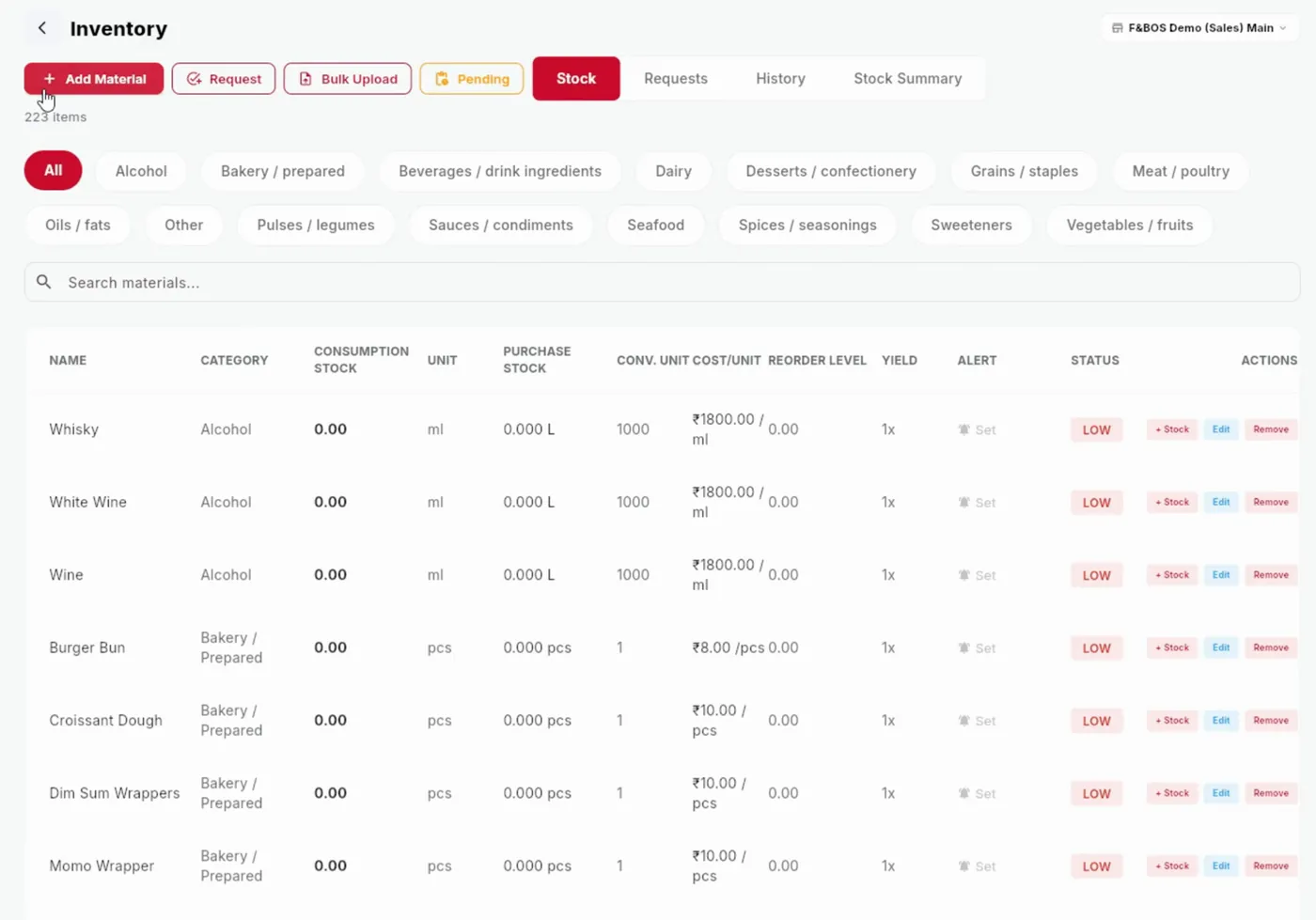
Real F&Bos screens. There is no Petpooja import screen; the team imports your sheets.
Petpooja vs F&Bos: questions to ask before switching
| Area | Ask | F&Bos |
|---|---|---|
| Delivery apps | Do I need Zomato and Swiggy in the POS? | Separately priced add-on |
| Devices | Windows app or browser? | Android, iOS, web browser; no desktop app |
| Stock | Recipe-based deduction? | Pro, or ₹3,500 pack on Basic |
| Kitchen | KDS and captain app? | Captain app on every plan; KDS on Pro or ₹4,000 pack |
| Controls | Who can reprint or edit? | OTP and roles on every plan |
| Setup | Who moves my menu? | Our team, in assisted setup |
Check Petpooja's side on its own website or your contract. For a dated, sourced comparison, see F&Bos vs Petpooja and Petpooja pricing.
Can you reuse your existing restaurant POS hardware?
| Hardware | Reuse? | Check |
|---|---|---|
| Windows PC or laptop | Yes, in a web browser | A current browser |
| Android tablet or phone | Yes, with the app | Android version |
| Thermal printer on USB or LAN | Yes, from a PC browser | Model, in the demo |
| Bluetooth printer | Check | Model, in the demo |
| Windows-only POS terminal | Browser only | Whether a browser runs well |
| Cash drawer | Check | Model, in the demo |
Source: F&Bos product team, 23 November 2026. Bring your model numbers to the demo; we don't promise every device works.
What does it cost to switch restaurant POS software?
| Cost | Amount |
|---|---|
| Basic, per outlet per year | ₹6,000 |
| Pro, per outlet per year | ₹15,000 |
| Enterprise (3+ outlets), per outlet per year | ₹24,000 |
| Self-setup | Free |
| Assisted setup, including menu conversion | ₹2,000 Basic · ₹3,000 Pro · ₹3,000–5,000 Enterprise, per outlet |
| User training | 1 day included |
| Hardware | Only if your devices don't fit |
Source: F&Bos pricing and the F&Bos product team, 23 November 2026. Plus 18% GST. Check your Petpooja contract for notice periods and renewal dates; we can't advise on them.
Frequently asked questions about switching from Petpooja
Can I switch from Petpooja to F&Bos?
Yes. Export your data, and our team sets up F&Bos from it.
Can my Petpooja menu be moved?
Yes, from an Excel or CSV export; we convert it in assisted setup.
Can F&Bos import past Petpooja sales?
No. Keep your Petpooja reports and invoices; F&Bos starts from go-live.
Will I re-enter every price?
No, prices come in with the menu sheet. Variants and combos are set up.
Can I keep my terminal and printer?
Often, in a browser or on Android; bring the models to the demo.
How long does it take?
Usually 2–3 days for one outlet; longer for big menus or several outlets.
Is training included?
Yes, 1 day, remote; an on-site visit is possible.
How do I start?
Book a free 20-minute demo or WhatsApp +91 79803 72217.
Guides to read next
Explore your restaurant POS migration options with F&Bos
Bring your Petpooja menu export to a free 20-minute demo and we'll show what moves, or read the switching guide.
Book Your Free Demo →Free 20-minute demo · Free self-setup, or assisted setup from ₹2,000 · WhatsApp: +91 79803 72217