 F&Bos
Restaurant ERP Software for Multi-Outlet Management
F&Bos restaurant ERP software connects billing, inventory, purchasing, a central kitchen and every outlet in one system: goods receipts, indents and dispatches, outlet-to-outlet transfers and a Branch P&L for each outlet, for chains, cloud kitchen networks and hospitality groups.
What is restaurant ERP software?
Restaurant ERP software connects the parts of a food business that a POS alone leaves apart: purchasing, stock, central production, outlets and the numbers behind them.
- Restaurant POS: bills, KOTs, tables and payments.
- Restaurant management software: adds inventory, staff, customers and reports.
- Restaurant ERP: adds goods receipt, central kitchen, stock transfers and outlet-wise profit across a chain.
F&Bos covers all three for restaurants. It keeps no accounts ledger: on Enterprise, sales go to Tally as an import file for your books.
Why growing restaurant businesses need integrated management
- Each outlet buys alone, at different prices from different suppliers.
- Gravies and bases are made in five kitchens and taste five ways.
- Stock moves between outlets on WhatsApp, and no one records it.
- Sales arrive daily, profit monthly, so a slipping outlet is spotted late.
Key features of F&Bos restaurant ERP software
Multi-outlet control
Every outlet on one dashboard, one menu with outlet-specific prices, and staff who see only their outlets.
Goods receipt and returns
Record deliveries on a goods receipt note, return goods to suppliers, and buy centrally for several outlets.
Recipe-linked inventory
Every bill deducts its recipe; supplier prices, wastage and closing stock value are kept per outlet.
Indent to dispatch
Outlets raise indents, the central kitchen produces in batches from recipes and dispatches; outlets confirm receipt.
Outlet-to-outlet transfers
One outlet dispatches, the other confirms, and both stocks update, with transfer history kept.
Outlet-wise P&L
A Branch P&L per outlet to operating profit, rolled up across the business.
Source: F&Bos product team, 23 November 2026.
Where the chain is run from
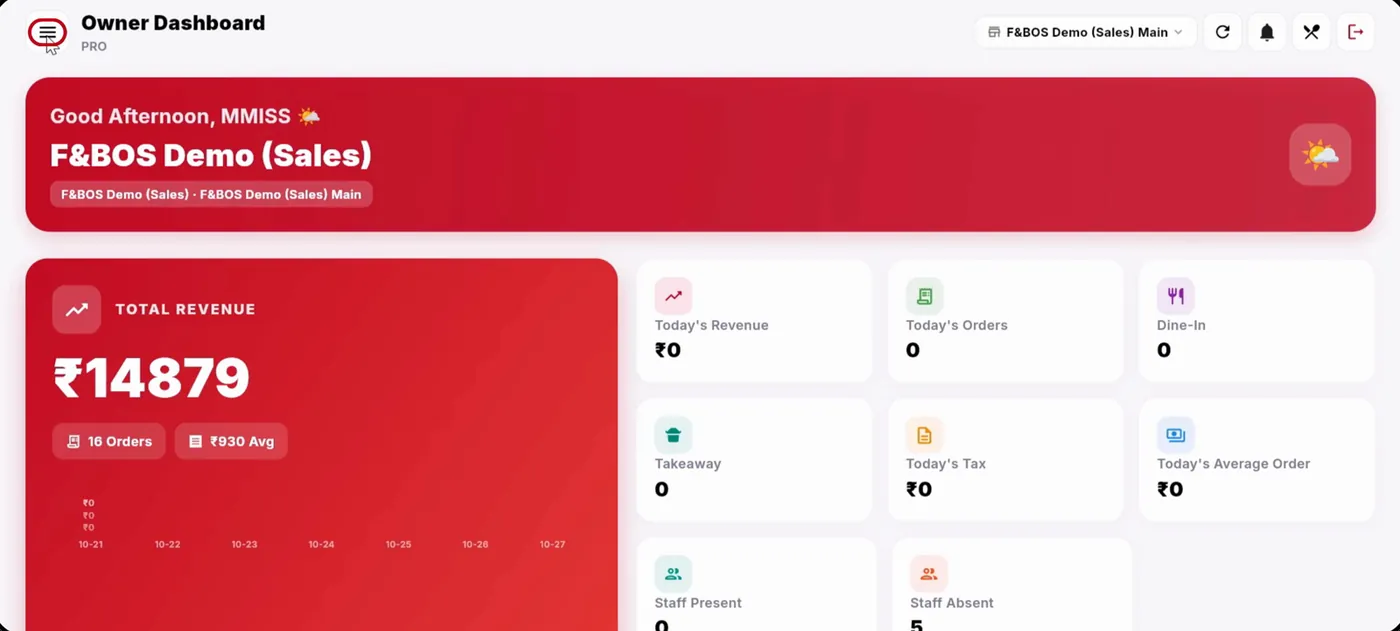
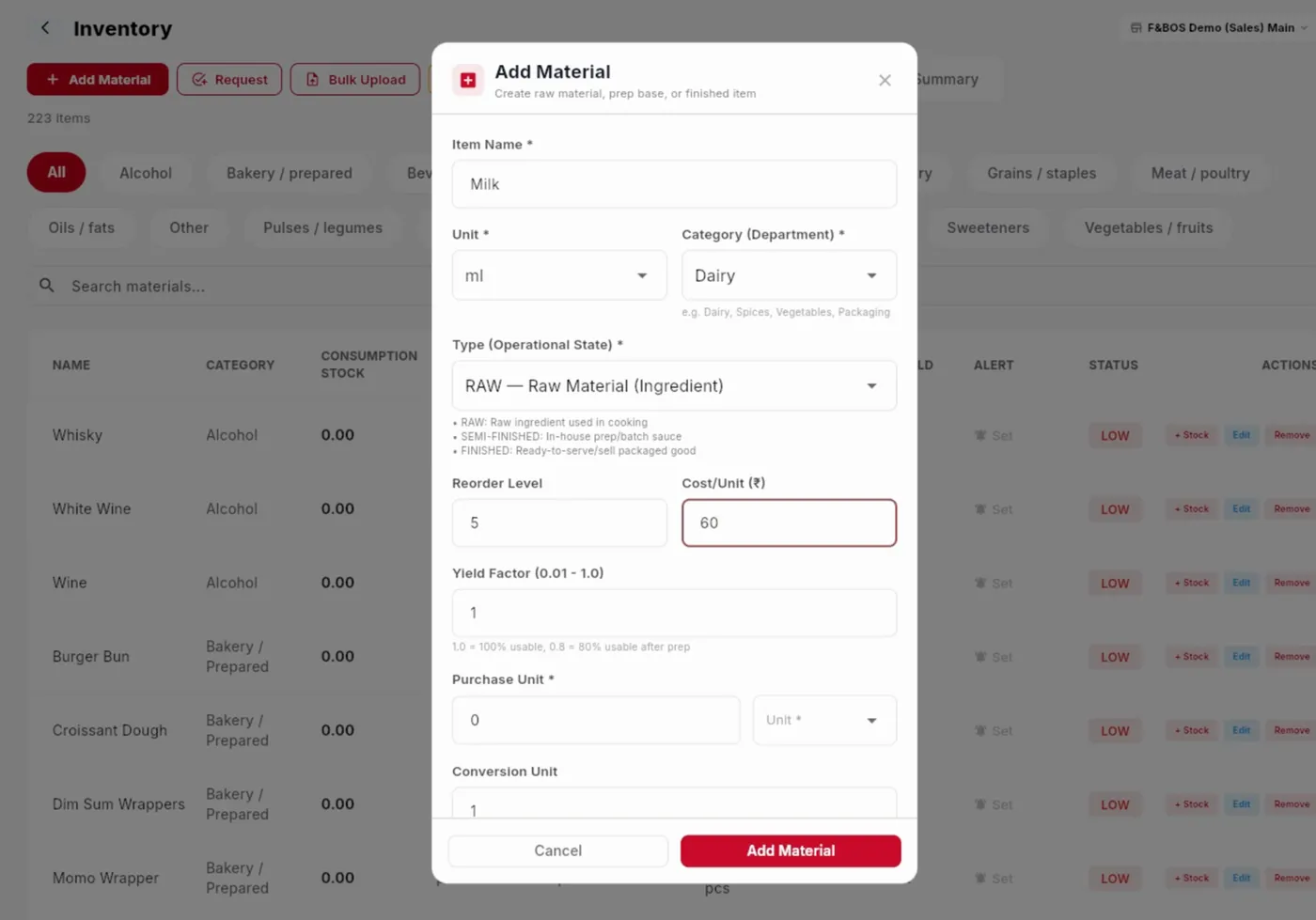
Real F&Bos screens.
How integrated restaurant management works
Goods receipt, returns, central buying
Indents, batch production, dispatch
Receipts, transfers, recipe-linked stock
Each sale deducts its recipe
Outlet dashboards, Branch P&L, roll-up
- Set up outlets, the menu with outlet prices, and staff access.
- Load stock items and recipes, shared or outlet-specific.
- Receive purchases on goods receipt notes, centrally or per outlet.
- Move stock through central kitchen dispatches and outlet transfers.
- Review each outlet and the roll-up.
Restaurant purchasing and procurement management
| Function | F&Bos | How it works |
|---|---|---|
| Supplier records | Yes | Supplier-wise purchase price history |
| Goods receipt notes | Yes | Record what was delivered; it adds to stock |
| Purchase returns | Yes | Return to the supplier; stock reduces |
| Central purchasing | Yes | One purchase for several outlets from head office |
| Reorder levels | Yes | Set per item, with low-stock alerts |
| Purchase orders and approvals | Not listed | Not a published F&Bos feature |
Source: F&Bos product team, 23 November 2026.
Central kitchen management for restaurant chains
A central kitchen makes gravies, bases and doughs for every outlet, so each dish tastes the same and ingredients are bought in bulk. In F&Bos the flow is:
- Indent: each outlet requests what it needs.
- Production: the central kitchen makes batches from recipes, using its raw stock and adding the prepared items.
- Dispatch to each outlet.
- Receipt: the outlet confirms, and its stock goes up.
Source: F&Bos product team, 23 November 2026. Batch production uses the same sub-recipes as recipe management software.
Manage inventory transfers between restaurant outlets
When Outlet B runs short on a Saturday, Outlet A can send stock. F&Bos records it in two steps: the sender dispatches, the receiver confirms, and both stocks update on receipt.
| Rice | Outlet A | Outlet B |
|---|---|---|
| Before | 50 kg | 20 kg |
| Transfer of 10 kg | −10 kg | +10 kg |
| After receipt | 40 kg | 30 kg |
Illustrative inventory example, not F&Bos transaction data.
| Transfer feature | F&Bos |
|---|---|
| Dispatch by sending outlet | Yes |
| Receipt confirmed by receiving outlet | Yes |
| Stock updated on both sides | Yes, automatically |
| Transfer history | Yes |
Understand outlet-wise restaurant performance
Sales are not profit. Gross profit takes off the cost of goods sold; operating profit also takes off staff, rent and other running costs. Net profit comes after depreciation, interest and tax.
| Metric | Outlet A | Outlet B |
|---|---|---|
| Net sales | ₹5,00,000 | ₹4,00,000 |
| Cost of goods sold | ₹1,75,000 | ₹1,60,000 |
| Gross profit | ₹3,25,000 | ₹2,40,000 |
| Operating expenses | ₹2,25,000 | ₹1,90,000 |
| Operating profit | ₹1,00,000 | ₹50,000 |
Illustrative example only, not actual F&Bos customer data.
The F&Bos Branch P&L builds this per outlet from sales, food cost, payroll and the expenses you enter, then rolls the outlets up. Net profit and statutory accounts stay with your accountant: see restaurant accounting software.
Restaurant ERP vs restaurant POS software
| Area | Restaurant POS | F&Bos |
|---|---|---|
| Billing | Core | Yes, every plan |
| Menu | Per outlet | Central, with outlet prices |
| Inventory | Varies | Recipe-linked, per outlet |
| Purchasing | Often none | Goods receipt, returns, central buying |
| Central kitchen | Rare | Indent to dispatch |
| Finance | Sales reports | Branch P&L, rolled up; Tally file |
Vendors use "ERP" loosely, so ask to see each module working. F&Bos is a restaurant management ERP, not a general accounting ERP. Integrations: Tally import file (Enterprise), Zomato and Swiggy as a separately priced add-on on every plan, and a hotel PMS for room posting.
Restaurant ERP solutions for growing food businesses
Restaurant chains: one dashboard and an outlet league table. See multi-outlet management.
Cloud kitchen networks: brands and kitchens supplied from one base. See cloud kitchen software.
Franchise networks: one menu and central supply; royalty billing is not part of F&Bos.
Central kitchen brands: indents, batches and dispatch in the same system as the outlets.
Hospitality groups: restaurants, bars and banquets under one login.
F&Bos restaurant ERP software pricing
| Plan | Includes | Per outlet per year |
|---|---|---|
| Basic | Billing, KOT, GST, captain app (inventory as a ₹3,500 pack) | ₹6,000 |
| Pro | Inventory, kitchen display, CRM, payroll, MarginMind | ₹15,000 |
| Enterprise (3+ outlets) | Pro plus multi-outlet dashboard, account manager, Tally file | ₹24,000 |
Source: F&Bos pricing, 23 November 2026. Plus 18% GST. Assisted setup with inventory is ₹3,000 per outlet on Pro and ₹3,000–5,000 on Enterprise. Which plan includes the central kitchen, transfers and central purchasing is confirmed in the demo.
Frequently asked questions about restaurant ERP software
What is restaurant ERP software?
Software that connects purchasing, stock, central production, outlets and reporting for a food business, not just billing.
What is the difference between restaurant ERP and POS?
A POS bills and runs service. An ERP adds purchasing, central kitchen, stock transfers and outlet-wise profit across locations.
Does F&Bos support multi-outlet restaurant management?
Yes: one dashboard on Enterprise, a central menu with outlet prices, and staff access by outlet.
Can F&Bos manage restaurant purchasing and procurement?
It records goods receipts and purchase returns, keeps supplier prices and supports central purchasing. Purchase orders and approvals are not listed.
Does F&Bos include central kitchen management?
Yes: outlet indents, batch production from recipes, dispatch and receipt confirmation by the outlet.
Can F&Bos transfer inventory between outlets?
Yes. The sender dispatches, the receiver confirms, and both stocks update, with history kept.
Does F&Bos provide outlet-wise P&L reports?
Yes, a Branch P&L per outlet to operating profit, rolled up across outlets. Net profit stays with your accountant.
How can I book a demo of F&Bos restaurant management software?
Book a free 20-minute demo or WhatsApp +91 79803 72217.
Connect your restaurant operations with F&Bos
See your outlets, central kitchen and stock movements in a free 20-minute demo, or explore F&Bos solutions.
Book Your Free Demo →Free 20-minute demo · Free self-setup, or assisted setup from ₹2,000 · WhatsApp: +91 79803 72217