 F&Bos
Juice Bar Billing Software for Fast Counter Operations
F&Bos juice bar billing software bills drinks with sizes and add-ons at the counter, deducts fruit by recipe, records how much juice each batch gives and logs spoiled fruit with a reason and rupee value.
What is juice bar POS software?
Juice bar POS software bills drinks at the counter, with sizes and add-ons, records cash and UPI, and shows daily sales. Better systems also track fruit: how much each glass uses, how much juice a batch gives, and what gets thrown away.
F&Bos does all of this. Billing is on every plan; the fruit tools are on Pro and Enterprise, or the ₹3,500 inventory pack on Basic.
Why juice shops need better billing and inventory control
- Queues at the counter at lunch and in summer.
- Three sizes and a dozen add-ons per drink.
- Fruit prices that change every week.
- Fruit that ripens and spoils in days.
- Peel, seeds and pulp that vary by fruit and season.
- Cups, lids and straws that add up.
Key features of F&Bos juice bar billing software
Fast counter billing
Drink, size, add-ons, then cash, UPI or card on one bill.
Sizes and add-ons
Small, medium, large with their own recipes; priced add-ons.
Fruit by recipe
Each glass deducts its fruit, milk and cup.
Juice batch yield
Fruit in, litres out, expected vs actual.
Wastage with reasons
Spoiled fruit and unsold juice, valued in rupees.
Daily sales
Item- and size-wise sales and day-end close.
Source: F&Bos product team, 23 November 2026.
Where you set up fruit and drinks
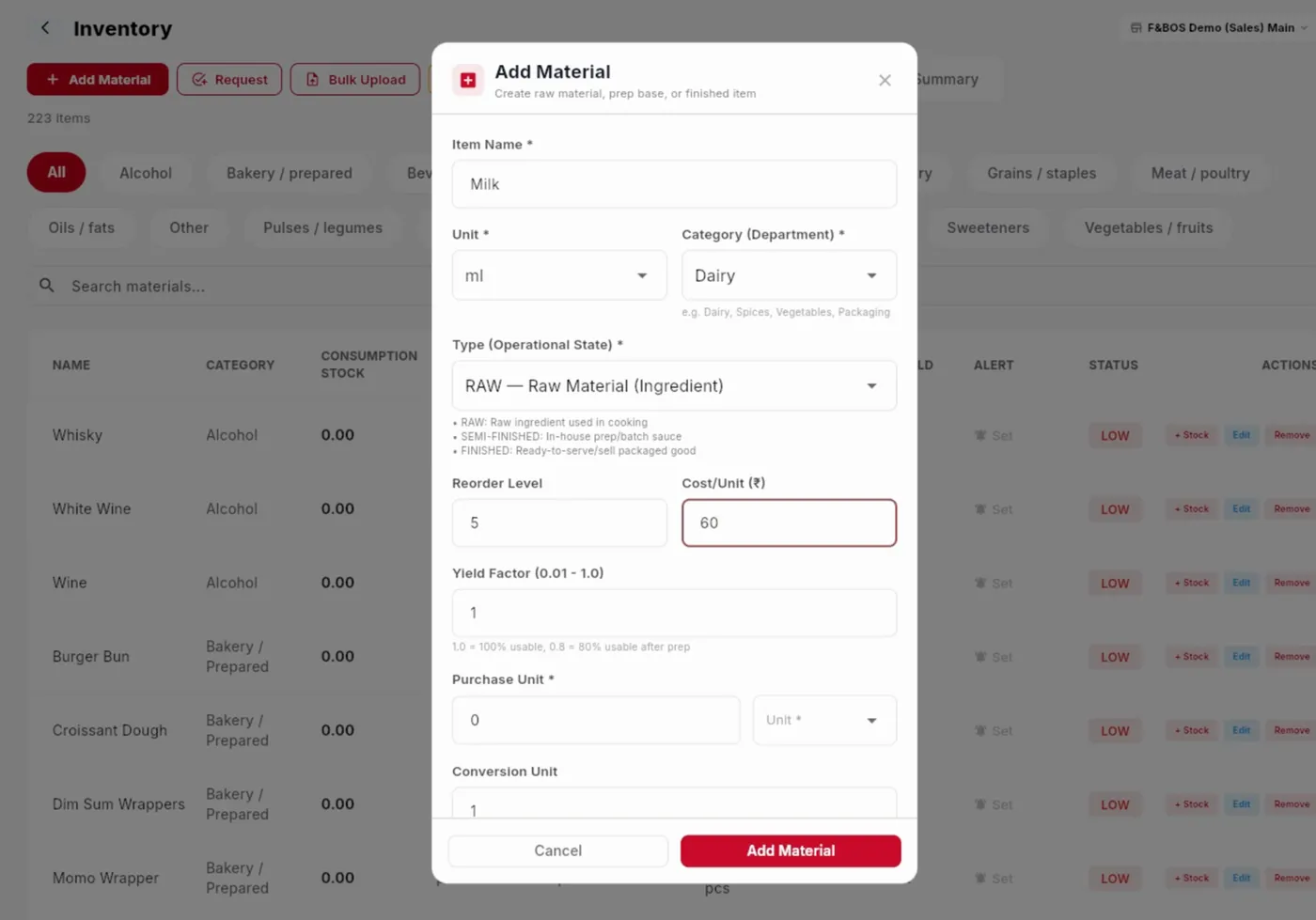
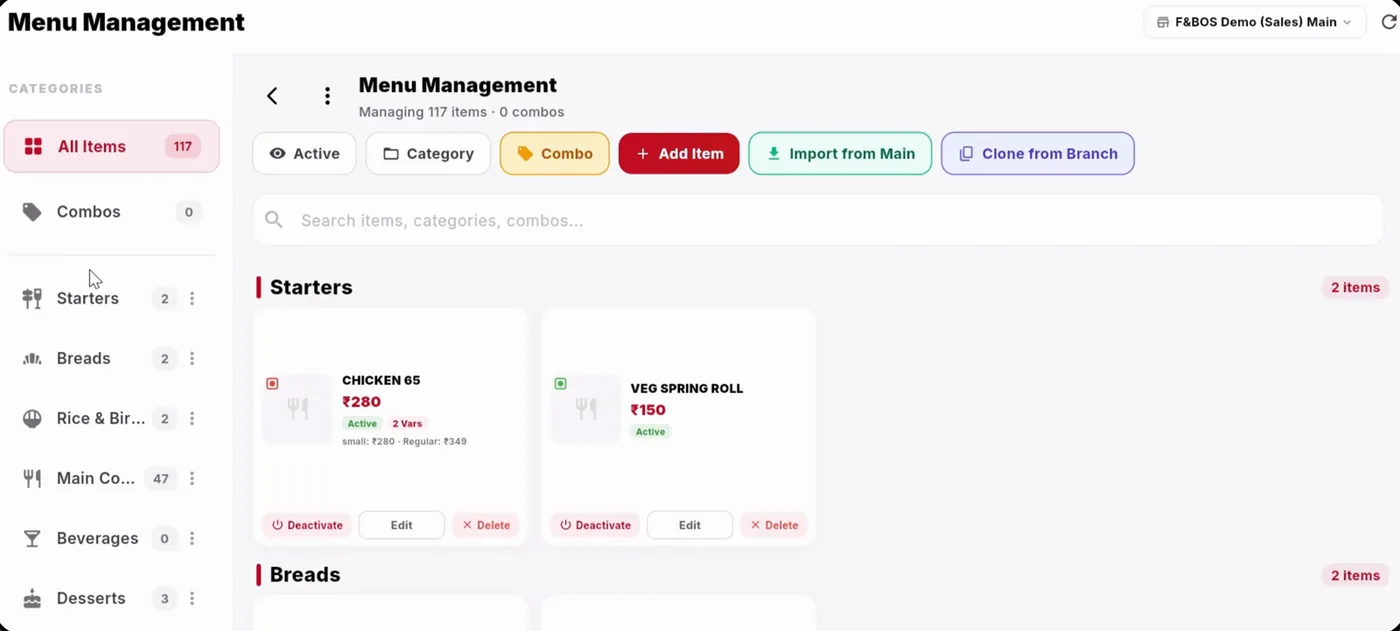
Real F&Bos screens from the web dashboard.
Simplify juice shop counter billing
Pick the drink and size, tap add-ons such as no sugar or extra fruit, and settle. A crowded counter can also take orders on the captain app.
| Item | Qty | Rate | Amount |
|---|---|---|---|
| Orange juice | 2 | ₹90 | ₹180 |
| Mango smoothie | 1 | ₹140 | ₹140 |
| Watermelon juice | 1 | ₹80 | ₹80 |
| Subtotal | ₹400 |
Illustrative example, not F&Bos customer prices or a receipt layout.
Sizes are variants with their own price and recipe. Add-ons can be required or limited, are priced and print on the KOT, but change the price, not stock; make extra fruit a variant if you need it counted.
Understand fruit yield and juice output
Yield is how much usable juice a quantity of fruit gives after peel, seeds and pulp.
10 kg oranges → 4,500 ml juice
4,500 ml ÷ 250 ml a glass = 18 glasses
Illustrative only. Kg in and ml out are different units, so this is an output ratio, not a yield percentage by weight. Real yield varies with variety, ripeness and juicer.
F&Bos handles it two ways. Made to order, each glass deducts fruit by recipe, costed with the fruit's yield factor. In batches, a production entry takes the fruit off stock and adds the litres you entered, and each glass deducts its ml.
| Yield feature | F&Bos | How it works |
|---|---|---|
| Raw fruit in | Yes | Production entry |
| Juice out | Yes | Entered in ml or litres |
| Yield factor per fruit | Yes | Costs the usable share |
| Glasses from a batch | Yes | Each glass deducts its ml |
| Expected vs actual yield | Yes | Per batch |
Source: F&Bos product team, 23 November 2026.
Track fruit wastage and spoilage
Three things look alike but aren't:
- Preparation loss: peel and seeds, covered by the yield factor.
- Spoilage: fruit that goes bad, recorded as wastage.
- Variance: the gap between expected and counted stock.
Illustrative data.
Each wastage entry has a quantity, a reason and a rupee value, and a made drink thrown away deducts its recipe. The wastage report groups waste by item and reason. Fruit can be received with an expiry date, and alerts show what to use first.
Calculate juice recipe costs and gross margins
| Smoothie ingredient | Example cost |
|---|---|
| Fruit | ₹35 |
| Milk | ₹18 |
| Sweetener | ₹5 |
| Ice and water | ₹2 |
| Cup and packaging | ₹10 |
| Total | ₹70 |
At ₹150: ₹150 − ₹70 = ₹80, about 53.3% gross margin on the listed costs. Rent, staff, power and tax still come out of it, so it is not profit.
F&Bos costs each recipe from your purchase prices and yield factors; see recipe costing software. Read the juice bar operations and profitability guide for a full P&L.
Manage fruit and beverage ingredient inventory
| Inventory function | F&Bos | How it works |
|---|---|---|
| Ingredient stock | Yes | Fruit, milk, curd, syrups, seeds, cups, lids, straws |
| Purchases | Yes | Bought in kg, used in g or ml |
| Recipe deduction | Yes | On each bill or batch |
| Wastage | Yes | Reason and rupee value |
| Low-stock alerts | Yes | Reorder level per item |
| Expiry | Yes | Date on receipt, with alerts |
Source: F&Bos product team, 23 November 2026. More in restaurant inventory management.
How juice bar billing works with F&Bos
Drinks, sizes and add-ons
Drink, size, add-ons
Cash, UPI or card
Fruit by recipe, or ml from a batch
Sales, yield and wastage
- Set up the menu with sizes and add-ons.
- Add fruit with units, yield factors and reorder levels.
- Write recipes per size, or record batches.
- Bill at the counter.
- Close the day: log waste, check sales and yield.
Juice bar POS software vs manual billing
| Area | Manual | F&Bos |
|---|---|---|
| Bill | Calculator, bill book | Tapped, GST worked out |
| Prices | Price board | One menu on every device |
| Day's sales | Added up at night | Day-end close |
| Fruit stock | Register | Deducted by recipe |
| Recipe cost | Spreadsheet | Costed with yield factors |
Juice shop POS for different beverage businesses
Fresh juice shops and mall kiosks: fast counter billing and daily sales.
Smoothie bars and health drink cafés: sizes and add-ons; see café billing software.
Seasonal stalls: change the menu and fruit prices as seasons turn.
Chains: Enterprise shows every outlet in multi-outlet management.
F&Bos juice bar billing software pricing
| Plan | Includes | Per outlet per year |
|---|---|---|
| Basic | Counter billing, sizes, KOT, GST, daily reports; 50 items. Fruit tools with the ₹3,500 inventory pack | ₹6,000 |
| Pro | Fruit stock, batches and yield, wastage, unlimited items | ₹15,000 |
| Enterprise (3+ outlets) | Pro plus the multi-outlet dashboard | ₹24,000 |
Source: F&Bos pricing and the F&Bos product team, 23 November 2026. Plus 18% GST. No separate juice bar plan.
Frequently asked questions about juice bar POS software
What is juice bar billing software?
POS software that bills drinks with sizes and add-ons and tracks the fruit behind them.
Can F&Bos manage different juice sizes?
Yes, as variants with their own price and recipe.
Can F&Bos handle smoothie add-ons and customisation?
Yes: priced add-ons that print on the KOT. They change the price, not stock.
Does F&Bos track fruit inventory?
Yes, on Pro, Enterprise or the Basic inventory pack, with expiry alerts.
Can F&Bos calculate juice recipe costs?
Yes, from purchase prices and each fruit's yield factor.
Does F&Bos support fruit yield calculations?
Yes. Record a batch's fruit and litres, and compare expected with actual yield.
Can F&Bos record spoiled fruit and wastage?
Yes, with a reason and rupee value, and a report by item and reason.
How can I book a demo of F&Bos juice bar POS software?
Book a free 20-minute demo or WhatsApp +91 79803 72217.
Simplify juice shop billing with F&Bos
See a juice batch go from fruit to glasses in a free 20-minute demo, or explore F&Bos features.
Book Your Free Demo →Free 20-minute demo · Free self-setup, or assisted setup from ₹2,000 · WhatsApp: +91 79803 72217